It’s a solid rebuttal, especially when talking about cables (even certified cables are often bullshit), BUT USB-C testers are cheap and you can quickly assess which standards are available for a given cable/port combo.
Still the fact that both USB and HDMI boards thought the current situation was appropriate pisses me off.
WhatCable is also great
We used to have time to eat serial, but now everything has to catch the bus.
still better than fake “i have prepared every port that anyone has ever seen for breakfast this morning, but the kids are only grabbing one measly USB C toast as they head out with friends”
I see this as an absolute win.
Obsolete win?
Wait… when did you ever need to turn off your PC before you can unplug your mouse or keyboard? Did people genuinely used to need to do this? When? Why?
Yes, PS/2 devices can’t be hotplugged.
They very often could be, in the later years. Except when they couldn’t.
Hotswapping wasnt always a thing. It was a feature before it was just generally expected
A common prank in school when I was there was to unplug someone’s keyboard and/or mouse then plug it back in.
It wouldn’t work again until the computer was rebooted.

Woooork?!
Oh thank god, I thought the machine was broken.
Today’s kids can’t afford a PC so it doesn’t matter either way.
But things were simpler then, you may think it was bad having so many different ports but you’d be surprised.
My experience is the opposite, no one ±5 years of me (born '90) ever had their own computer until they were in their late teens, and only a few had that then, most only got their own when they started working. Now my younger half-brother (born '12) and most of his friends have their own computer and consoles. And we’re very much not higher-middle class, many (including my family) are working class and barely scrape by. It’s just a more important thing for kids now so they save money for years and ask for all their presents to be money for it.
That’s why i said today, if you got your PC or console a few years ago you were fine.
Today a stick of RAM costs almost as much as a basic PC just 2-3 years ago.
Thank you!
USB C is hell.
Why won’t this docking station with 4 USB ports support all 4 USB devices being plugged in?? Oh because it’s just USB, not Thunderbolt.
Hold on lemme me consult a long ass chart so I know what all these obscure symbols next to the port translate to
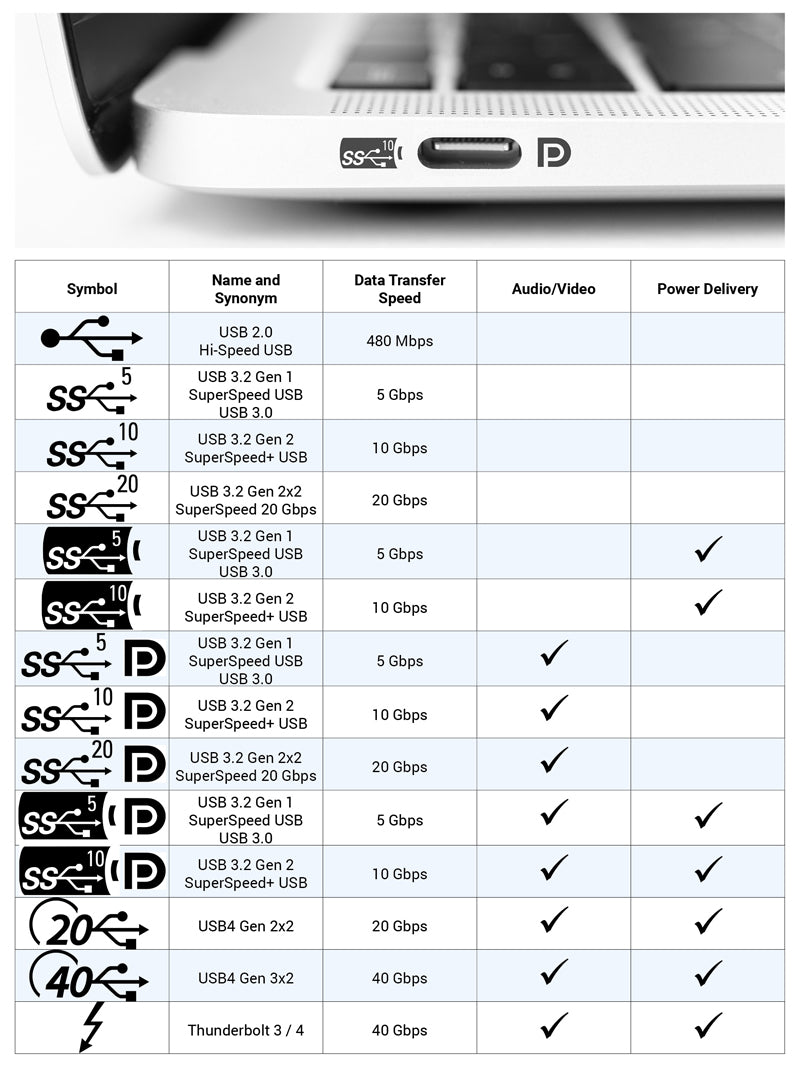
3.2 Gen 2 is wild. Second generation of the second revision of the third version? Why wouldn’t you call that 3.3?
Yeah, the naming convention for USB is honestly wild. Especially because they have changed the numbers in the past, so old devices are labeled incorrectly. The version went from USB 2.0 to USB 3.0…3.0 was twice as fast as 2.0 and introduced some new architecture, so it makes sense to have a whole new number. And that was fine for a while.
Then they added a USB 3.1. It doubled the speed again, but relied on the same basic architecture. Sure, fine, whatever. Not a whole number revision, but at least 3.1 is distinct from 3.0.
Then they had a fucking stroke, and renamed 3.0 to 3.1 Gen 1, and moved the old 3.1 to 3.1 Gen 2. So now all of the old USB 3.0 and 3.1 ports are incorrectly labeled, because they literally changed the names after devices had already been on the market for years. And it means 3.1 Gen 1 is the same speed as 3.0, but all of the old (now mis-labeled) 3.1 ports will be twice as fast as 3.1 Gen 1.
Then they release USB 3.2. Another doubling in speed, but again, relying on the same architecture as 3.0. Or wait, now that’s 3.1 Gen 1. Fuck. Okay, well it’s faster but not a big enough change to require a whole number increment… So sure, 3.2 I guess. So now we have 2.0, 3.1 Gen 1, 3.1 Gen 2, and 3.2…
Then they had another fucking stroke, and renamed 3.1 Gen 1 to 3.2 Gen 1, 3.1 Gen 2 became 3.2 Gen 2, and 3.2 became 3.2 Gen
32x2 wait what the fuck did they just completely abandon the “Gen {next whole number}” naming scheme halfway through renaming everything?? God fucking damn it.So now 3.2 Gen 1 is the same speed as 3.0, but is half the speed of 3.1. But 3.1 is the same speed as 3.2 Gen 2. And 3.2 Gen 2 is twice the speed of 3.1, but half the speed of regular 3.2?? And don’t even get me started on how 3.2 Gen 1 is only a quarter of the speed of 3.2, which was the first generation of 3.2 but isn’t called 3.2 Gen 1.
Finally, we get USB 4. Odd that it’s not 4.0, but at least it’s a new whole number. Can we abandon the dumb naming schemes now?? This one supports a whopping 20Gbps. Which is… Wait. 3.2 (3.2 Gen 2x2) also supports 20Gbps? Why the fuck did this get a whole number but 3.2 didn’t?? Fuck it, at least we’re onto a new whole number. This is our chance to reset and start fresh. No more of the dumb “we’re changing the name of something that has existed for years, and now all of the old labels are inaccurate” stuff. We can all be happy now, right?
The next revision! This one supports 40Gbps. Another doubling from the old USB 4. And this new one is called USB 4… No wait, that can’t be right. No… They didn’t. They wouldn’t. They called it the same fucking thing as the old version? You were supposed to be the chosen one! You were supposed to bring balance to the naming convention, not leave it in darkness!
(╯°□°)╯︵ ┻━┻
Okay, okay… Let’s take a moment. Find some sort of silver lining. At least they didn’t rename all of the old 3.x shit again.And then in 2022, specs were published for the next USB iteration. This one supports a whopping 80Gbps. And it is called… USB 4 2.0. We already have a USB 2.0. But now apparently we have a USB 4 2.0 as well. Couldn’t this have been 4.1? Or 5? Hell, I’d even accept USB 4.2.0… But no. USB 4 2.0… Fuck it, I give up. I’m tired.
For a supposedly seamless standard those seams are quite visible. Its no reason why these comparisons are made, when below the surface this standard is literally hell.
This standard should really pull their shit together. Like the legacy connectors, USB is the same - but it sweeps that complex necessary shit right under the carpet.
They’re using the same naming system as my home folder
At least that has an indicator of what it supports.
That’s better than 99% of USB C ports.
I mean if you have one good cable you can use it for everything else as well… Try shoving your firewire port up a DVI connector…
My box of various obscure cables will be passed on to my son when I die. You never know when you might need one.
You could always unplug your keyboard or mouse without rebooting. Plugging it back in though…
Despite all its problems, USB and especially USB-C have been a blessing.
Toslink is not dead yet. It still is the standard for sound systems. And IMO that’s not even a bad thing as it just. always. works.
Eh, HDMI is largely replacing it, even when it just carries audio and not video.
Yeah, TOSLINK is only really necessary if you’re trying to ground-isolate your audio system. Depending on how your power is set up, you can get a ground buzz between two audio devices. Literally an audible buzz at whatever your local AC frequency is, caused by a difference in potential across the two devices’ ground connection. So probably 50 or 60Hz, depending on where you live. But since TOSLINK is optical and doesn’t have a conductor to carry a ground connection between the two devices, there is no risk of a ground buzz.
It is also great if you want to split it up/duplicate it, so have multiple outputs on one source signal. Just a cheap splitter will do just fine, and I can simply only turn on the device I currently want to use without any interference or noticable delay whatsoever. No need to tell the duplicater which device I want to use. I tried the setup with aux/chinch y-cables and it was just horrible. It is even fast enough to have the TOSLINK duplicater, then a TOSLINK to chinch splitter, than use that as input for my good old 5.1 system. The other TOSLINK channel parallely goes to 5.1 headphone sender.
Hooray for standards!

I hated DVI more than I hated VGA, somehow a pin will eventually bend.
You haven’t known hate for a display connector until you have experienced the DMS-59:
https://en.wikipedia.org/wiki/DMS-59
Same size as a DVI connector, double the ammount of pins, with twice or thrice the weight hanging off the end
I remember that bastard.
Remember, I have seen those things out in wild as recently as 5 years ago.
I have seen this weeks ago.
And I have seen one active DisplayPort to DVI adapter with an additional USB A cable to power it.
Just looking at it made me angry thanks!
Lol
Then you have the graphics connector that I absolutely hate.
DMS-59
Look at the DVI-D Dual Link, that has 24 pins and a blade. DMS-59 uses the same size for the connector, but removes the blade and fits 59 tiny pins in the same space.
It then uses a heavy and bulky splitter cable that puts strain on the connector. The splitter is then connected to two DVI or VGA connectors, adding even more weight and strain on the DMS-59 connector.
It is an idiotic standard and made my love for DP grow strong. Especially once I learned about MST.
I love DP
To bring it back to display connection standards, I’m personally a big fan of DisplayPort
I remember that bastard.
DVI-I cord with a DVI-D computer? Absolutely not. It’s got these 4 extra pins that you’ll ruin if you try.
Remember having to park your hard drive before turning off the computer?
Seems to be missing some ports I distinctly remember, like USB B, IR, mini Toslink, dual PS/2, dual e-SATA/USB A, powered USB A, mini coax, BNC, and a few others. Not to mention proprietary crap like HP LifeDrives.
Edit: Mini and Micro HDMI also missing.
Also a ton of SCSI connectors
I just plug in my USB devices and they work. What am I doing wrong?
This was for PS/2 which wasn’t hot-swappable and there was a small chance you could fry your motherboard if unplugged or plugged in incorrectly as it went straight to your motherboard microcontroller.
The upside was it initialized at POST so passed straight to BIOS
USB A 3.0